- Published on
What is Kafka? Core Components in Kafka - Comprehensive Guide from A-Z
- Authors

- Name
- Tai Vo
- linkedin/tai-vo-84a911157/
Table of Contents
- 1. What is Kafka?
- History
- 2. Architecture and Core Components of Apache Kafka
- 2.1. Kafka Events
- 2.2. Kafka Topics
- 2.3. Kafka Brokers and Clusters
- 2.4. Kafka Partitions and Replication
- 2.5. Kafka Producers
- 2.6. Kafka Consumers
- 2.7. ZooKeeper (Legacy)
- 2.8. Kafka APIs
- 3. Advanced Integrations with Kafka
- 3.1. Kafka Connect
- 3.2. Kafka Streams
- 3.3. Schema Registry
- 4. Advantages of Kafka
- 5. Disadvantages of Kafka
- 6. Real-world Use Cases of Kafka
- 6.1. Activity Tracking
- 6.2. Metrics & Monitoring
- 6.3. Stream Processing
- 6.4. Event Sourcing
- 6.5. Data Integration
- 6.6. Commit Log
- 7. Conclusion
- 📚 References
In the era of distributed systems and real-time data processing, Apache Kafka has established itself as one of the most critical platforms for data streaming and event-driven architecture.
This article is suitable for developers, data engineers, system architects, and anyone who wants to learn about Kafka and its application in microservices.
1. What is Kafka?
Apache Kafka is an open-source distributed event streaming platform, developed by the Apache Software Foundation and written in Java and Scala.
"Apache Kafka is an open-source distributed event streaming platform used by thousands of companies for high-performance data pipelines, streaming analytics, data integration, and mission-critical applications."
History
- 2011: Kafka was originally developed by LinkedIn and later open-sourced and donated to the Apache Software Foundation.
- Founding team: Jay Kreps, Neha Narkhede, and Jun Rao (who are also the co-founders of Confluent).
- Naming: Named after the author Franz Kafka - one of the greatest writers of the 20th century.
Kafka is designed to solve the challenges of processing massive amounts of data in real-time, allowing applications to efficiently publish, subscribe, store, and process event streams.
2. Architecture and Core Components of Apache Kafka
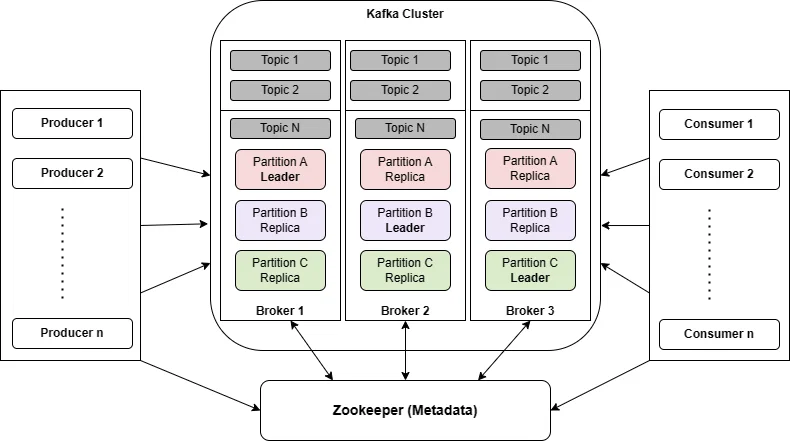
To understand how Kafka works, we need to master the following core components:
2.1. Kafka Events
A Kafka event (also called a record or message) records the fact that "something happened" in the world or your business. Each event consists of:
- Key: Event identifier (optional)
- Value: The event data
- Timestamp: Time when the event occurred
- Metadata: Additional information
Example of a Kafka Event:
{
  "key": "Violet",
  "value": "Made a payment of $100 to Alex",
  "timestamp": "Jun. 25, 2023, at 2:06 p.m."
}
2.2. Kafka Topics
Topics are where events are organized and durably stored. You can visualize it as:
- Topic = Folder in a filesystem
- Event = File residing within that folder
Partitions are the fundamental unit of parallelism in Kafka:
- Each topic is divided into multiple partitions
- Each partition is hosted on a different broker
- This enables horizontal scaling and significantly improves performance
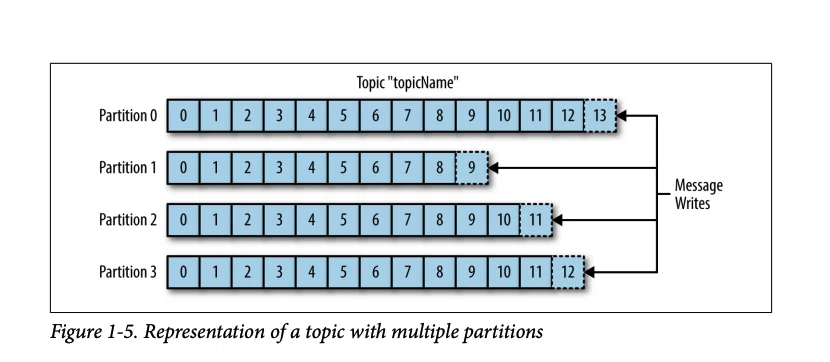
Each partition can only be read by one consumer within the same consumer group. This is a crucial factor when designing the system.
2.3. Kafka Brokers and Clusters
A Kafka Cluster consists of one or multiple Kafka Brokers:
- Broker: A Kafka server responsible for managing storage, handling read/write requests, and replicating data.
- Cluster Controller: A special broker designated to manage partitions and monitor the health of the cluster.
- Scalability: Can be scaled across multiple data centers or the cloud.
2.4. Kafka Partitions and Replication
Offset: Each event in a partition is assigned a unique offset (starting from 0), which helps pinpoint the exact location of the event.
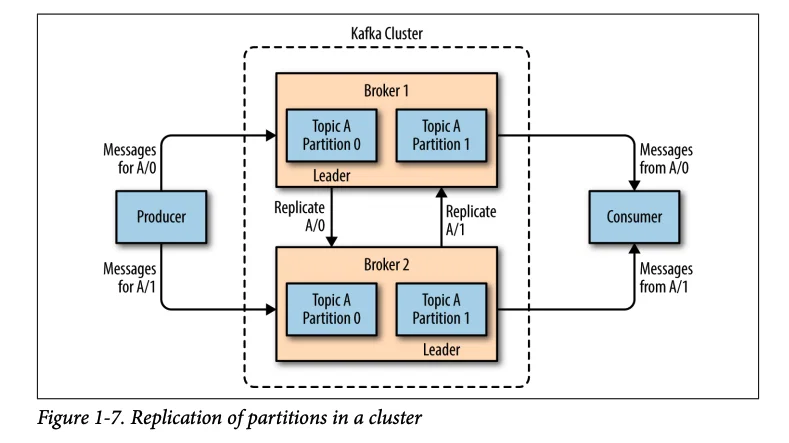
Replication Factor:
- Each partition can have one or more replicas across different brokers
- Leader: The primary broker that handles all read/write requests
- Followers: Brokers that replicate data from the leader
- Leader Failover: If the leader fails, a follower is elected as the new leader
| Component | Description | Role |
|---|---|---|
| Leader | Primary broker | Handles all read/write operations |
| Follower | Standby broker | Syncs data from the leader, ready to take over when needed |
| In-Sync Replica (ISR) | Healthy followers | Candidates for leader failover |
2.5. Kafka Producers
A Producer is a client application that publishes events to Kafka topics.
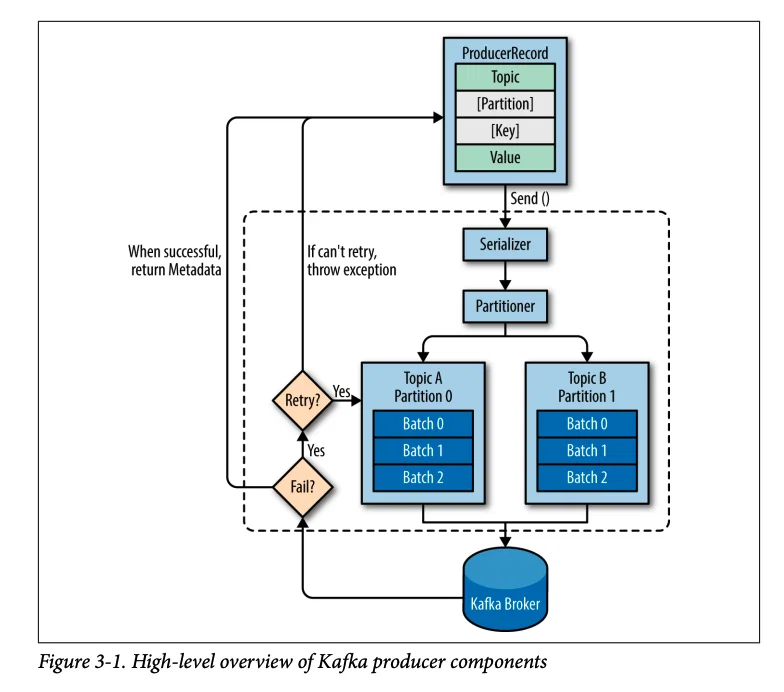
Event sending workflow (4 steps):
- Create ProducerRecord: Includes topic, value (required), and partition/key (optional)
- Serialization: Converts key and value into byte arrays
- Partition Selection: The partitioner decides which partition the event will go to
- Batch & Send: Events are batched together and sent to the broker
Producers always write to the Leader broker of the partition.
2.6. Kafka Consumers
A Consumer is a client application that subscribes to and reads events from Kafka topics. Consumer Groups allow:
- Multiple consumers to work together
- Horizontal scaling
- Each partition to be read by only one consumer within the same group
3 scenarios when using Consumer Groups:
| Scenario | Consumers vs Partitions | Result |
|---|---|---|
| Scenario 1 | Consumers < Partitions | One consumer will process and read data from multiple partitions simultaneously. |
| Scenario 2 | Consumers = Partitions | Ideal — Each consumer holds the read/write configuration on exactly 1 partition, optimizing performance. |
| Scenario 3 | Consumers > Partitions | Not recommended — Excess consumers will fall into an idle state because no partition is assigned to them. |
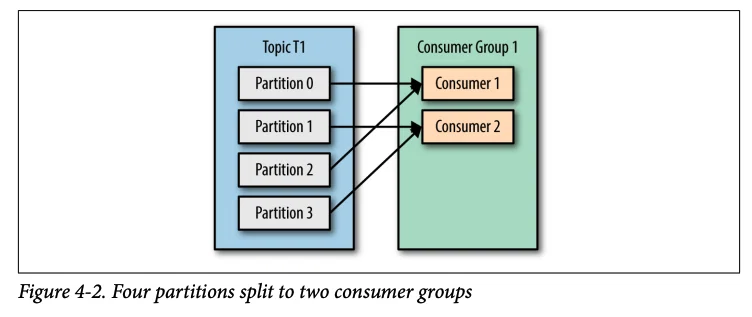
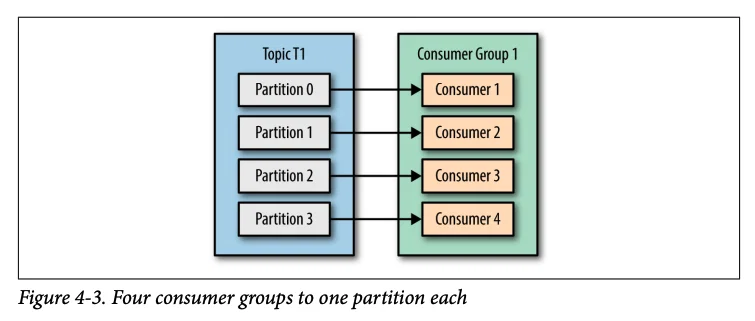
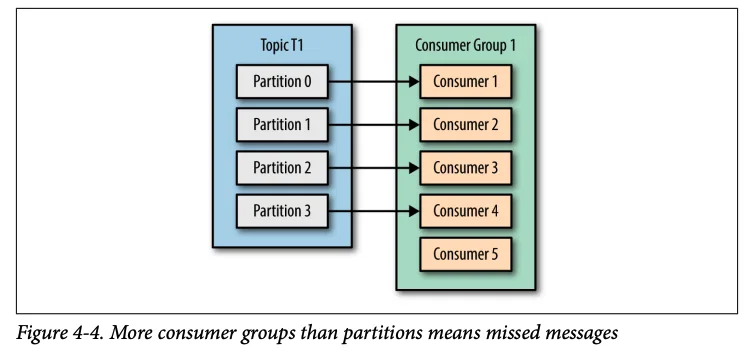
You shouldn't have more consumers than partitions because it leaves consumers idle, wasting resources.
2.7. ZooKeeper (Legacy)
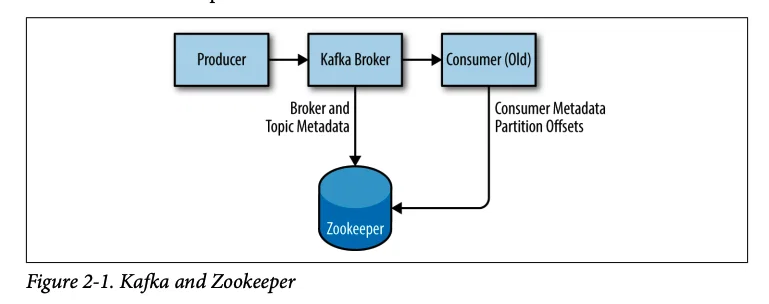
ZooKeeper was traditionally used to:
- Manage cluster metadata
- Coordinate consumers
- Maintain configuration information
[!NOTE] Since Kafka 2.8.0, Kafka can operate without ZooKeeper through KRaft (Kafka Raft mode).
KRaft is a new consensus protocol introduced in Kafka, allowing Kafka to manage its own metadata without relying on ZooKeeper. This helps:
- Simplify the architecture
- Improve performance
- Reduce operational complexity
KRaft was introduced in Kafka 2.8.0 and became production-ready in Kafka 3.3.1.
2.8. Kafka APIs
Kafka provides 5 core APIs:
| API | Function |
|---|---|
| Producer API | Allows applications to send streams of records to one or more Kafka topics. |
| Consumer API | Allows applications to read streams of records from one or more topics. |
| Streams API | Acts as a stream processor, helping to transform input streams into output streams. |
| Connect API | Builds and runs reusable connectors that link Kafka to external systems (e.g., databases, key-value stores, search indexes, or file systems). |
| Admin API | Helps manage and inspect Kafka objects like topics, brokers, acls, and other configurations. |
3. Advanced Integrations with Kafka
3.1. Kafka Connect
Kafka Connect is a framework for scalable and reliable data streaming between Kafka and other systems:
- Source Connectors: Pull data from external systems into Kafka
- Sink Connectors: Push data from Kafka out to external systems
- Use cases: Database replication, log aggregation, metrics collection

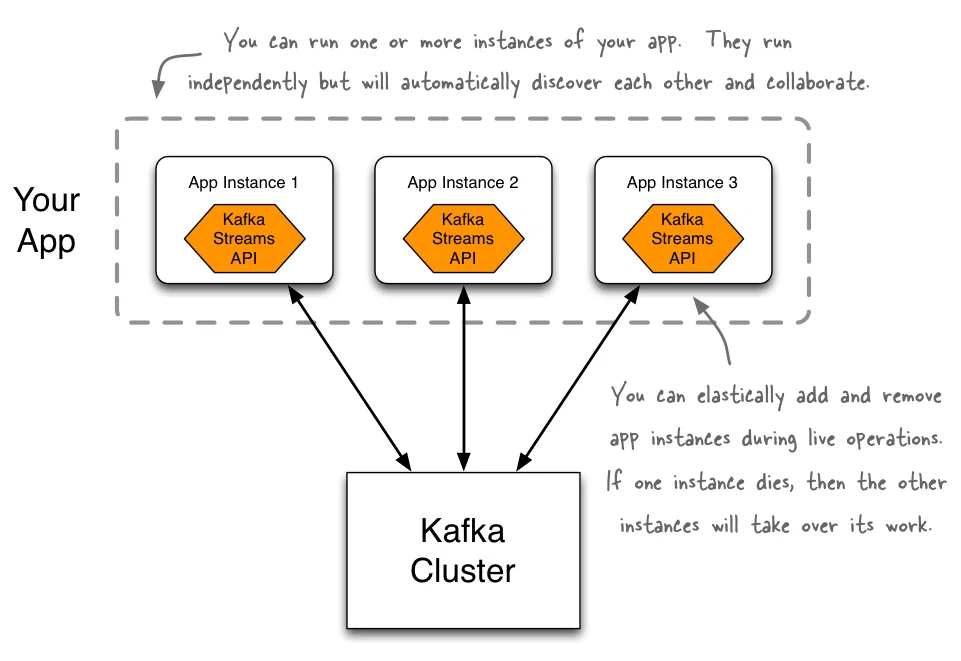
3.2. Kafka Streams
Kafka Streams is a client library for building applications and microservices, where the:
- Input/output data is stored in Kafka clusters
- Process real-time streaming data
- Combines the simplicity of writing Java/Scala apps with the core benefits of Kafka clustering
3.3. Schema Registry
Schema Registry provides:
- Centralized storage for schemas
- Validation and compatibility checking
- Serialization/deserialization (Avro, JSON Schema, Protobuf)
- An API for producers and consumers to check compatibility
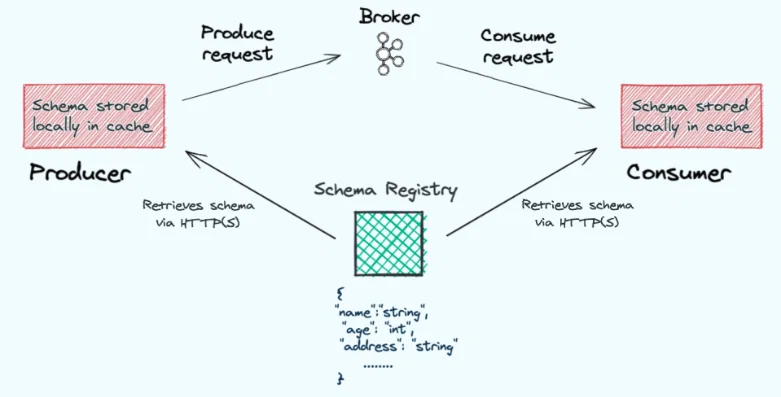
Ensures data compatibility between producers and consumers, preventing breaking changes in production.
4. Advantages of Kafka
| Advantage | Description |
|---|---|
| 📈 Scalability | Distributed architecture allows for easy horizontal scaling by simply adding more brokers and partitions. |
| 💾 Durability | Data replication across multiple brokers combined with the append-only commit log ensures your data is secure and won't be lost. |
| ⚡ Real-time Processing | Supports continuous data streaming and processing in real-time with ultra-low latency (in milliseconds). |
| 🔓 Open-source | Completely free, backed by a massive community, and boasts powerful integration capabilities with many other tools and libraries. |
| 🔄 Long Polling | A pull-based mechanism combined with long polling enables consumers to efficiently pull data, optimizing and minimizing network overhead. |
| 📊 High Throughput | Extremely high throughput capabilities, capable of handling and transferring millions of messages per second without performance degradation. |
| 🔧 Fault Tolerance | Highly fault-tolerant thanks to automatic failover mechanisms and high availability architecture. |
5. Disadvantages of Kafka
| Disadvantage | Solution / Mitigation |
|---|---|
| 🐘 ZooKeeper Dependency (older versions) | Upgrade to a newer Kafka version to run in KRaft mode (supported since 2.8.0+), eliminating ZooKeeper dependency and simplifying the architecture. |
| ⚙️ Complexity | Invest properly in operational training, or switch to fully managed cloud services like Confluent Cloud or AWS MSK to reduce the infrastructure management burden. |
| 💰 Resource Requirements | Needs careful capacity planning from the start, combined with strict monitoring systems and auto-scaling mechanisms. |
| 📚 Learning Curve | Adopt gradually by starting with simple data use cases, then incrementally increasing scale and complexity as the team masters the technology. |
| 🔧 Tuning Required | Spend time researching and fine-tuning configurations to optimize performance for your specific business requirements. |
6. Real-world Use Cases of Kafka
6.1. Activity Tracking
- Use case: LinkedIn uses Kafka to track user activities (page views, searches, clicks)
- Flow: User actions → Kafka topics → Backend processing → Analytics
6.2. Metrics & Monitoring
- Collect metrics from applications and infrastructure
- Real-time monitoring and alerting
- Log aggregation from multiple sources
6.3. Stream Processing
- Real-time data processing
- Fraud detection in financial transactions
- Sensor data processing (IoT)
- Real-time recommendations
6.4. Event Sourcing
- Store state changes as a sequence of events
- Audit trails and compliance
- Rebuild state from event history
6.5. Data Integration
- Bridge between heterogeneous systems
- Database replication (CDC - Change Data Capture)
- Microservices communication
6.6. Commit Log
- External commit log for distributed systems
- Data synchronization between nodes
- Disaster recovery and state recovery
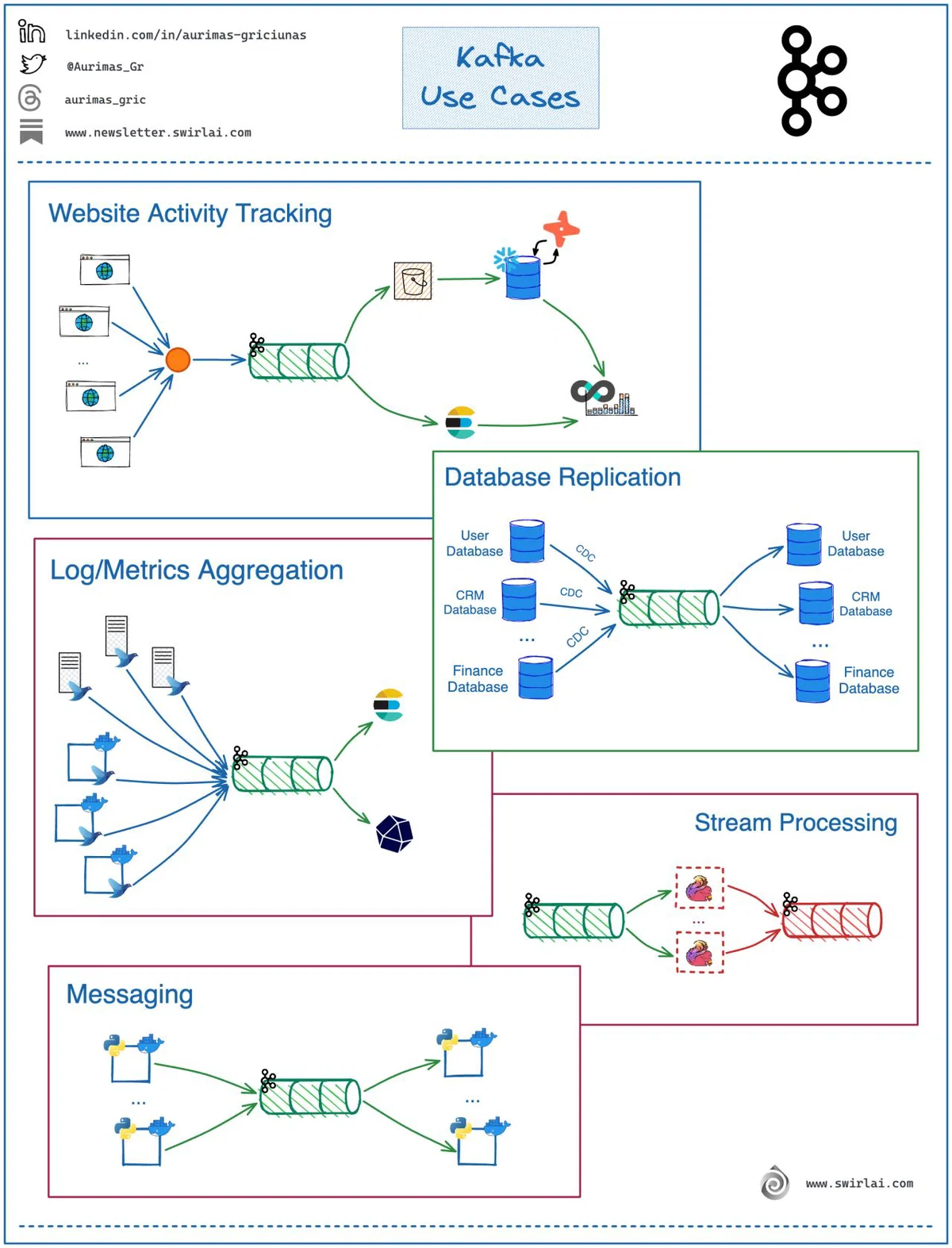
Kafka is not just a message queue - it's a complete platform with Connect, Streams, and Schema Registry forming a robust ecosystem for data streaming.
7. Conclusion
Apache Kafka has revolutionized how organizations handle data streaming and event processing. With its:
- ✅ Robust distributed architecture
- ✅ Fault tolerance and high availability
- ✅ Virtually limitless horizontal scalability
- ✅ Low-latency real-time processing
Kafka is ideal for:
- Big Data pipelines
- Real-time analytics
- Microservices communication
- Event-driven architectures
- Log aggregation and monitoring
Understanding Kafka's core concepts is the essential foundation for maximizing the potential of real-time data streaming. Start with simple use cases and gradually expand into more complex architectures.
📚 References
- Apache Kafka Official Documentation
- Kafka: The Definitive Guide
- Confluent Kafka Tutorials
- KIP-500: Replace ZooKeeper with KRaft
Want to learn more about Kafka?
Explore our Kafka series: Setting up a cluster, Kafka Streams, Kafka Connect, and best practices in production.